[ITEM]
04.03.2020

Windows Password Crack Iso

65

Reset Windows Password (zipped ISO image) Reset Windows Password was developed for resetting, changing and recovering Windows logon passwords and unlocking user account. For example, when the Administrator’s password is lost or forgotten. Lazesoft Recover My Password Home Edition is a Windows Password Recovery Freeware to reset lost Windows logon password to blank.

Password protection adds another level of security to your computer. It is simple enough to lock your User Account.

You can either set a new password during installation or later on in Control Panel. Though it is not required if you are the only user of your machine, password is important if multiple users are using the same machine or when trying to assign a User Account for your child with parental controls. But one problem which is literally annoying is when you. But there are different ways to get around a logon password without even knowing it.

Using a password reset disk is a very common option to. But the only catch is that you should have a password reset disk in advance. If you don't have any reset disk, don't worry. We are going to fix it using these methods. Method 1.

Crack Windows 10 Password with Kon-Boot allows you to log on to Windows without even knowing the password. It just hooks into the BIOS and changes the Windows kernel contents temporarily while booting.

Then, you can enter anything or leave the password blank while logging in. The original password will come again when you start your PC next time without Kon-Boot. The system will discard those changes and will act as if nothing happened.

Simply download Kon-Boot on another system and burn the ISO file to CD or write the image file on a USB drive. After doing it, simply boot your locked PC to external device where ISO file or image is written. Set the boot device to USB or CD in BIOS and it will show up a white screen.

Press any key and it will show up the process of tweaking BIOS functions. The system will boot normally after a few seconds. Cons: 1) Doesn't work with latest Windows 10. 2) Complicated text based program.

Also read: Method 2. Reset Microsoft Password After Windows 8, people are mostly using their official Microsoft account to log into their Windows. In case you forgot your password in Microsoft account, simply use another to visit the password reset page on Microsoft site and reset the password online.

It is a lot easier than resetting the password on local account. Go to from a separate computer or smartphone and select 'I Forgot My Password' and click next.

You need to use your alternate email or phone number you've provided when starting your Microsoft account. It won't work if you don't have an alternate email. Here, Windows 10 account can be converted to a local account from boot media, so you don't have to lose files to log into Windows 10. Enter the security code and move to the next page. Doesn't work with local or administrator accounts. Resetting Microsoft account password will directly reset the password of your Microsoft related services as well like Skype, One box, Hotmail, etc. Break Windows 10 Password with WinGeeker Ultiamte You can still bypasses the log-in screen without actually re-installing the operating system, just by using.

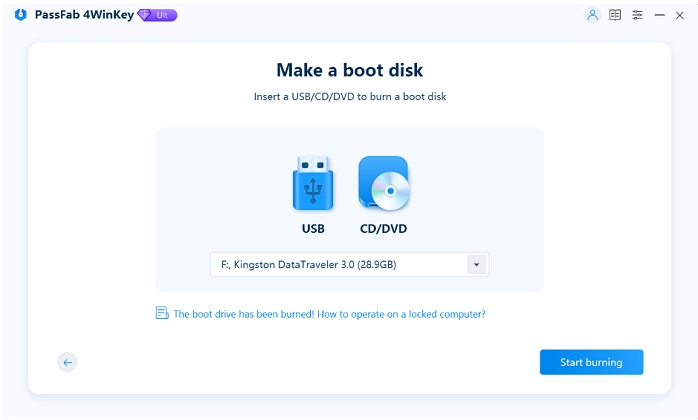
It can be installed in Windows virtual space without using your PC, which will read iSO files and Windows underlying data and run in DOS without password. It provides visual interface to the users which is very simple to use. You can burn ISO files directly with this tool to USB drive/CD/DVD in Windows and without using reset disk. It is guaranteed that no data loss will occur and it can be used to crack any types of account password like local, administrator, Microsoft, root and domain profiles. Step 4 Begin to Crack Windows 10 Login Password After changing the boot order to USB and restart your PC.

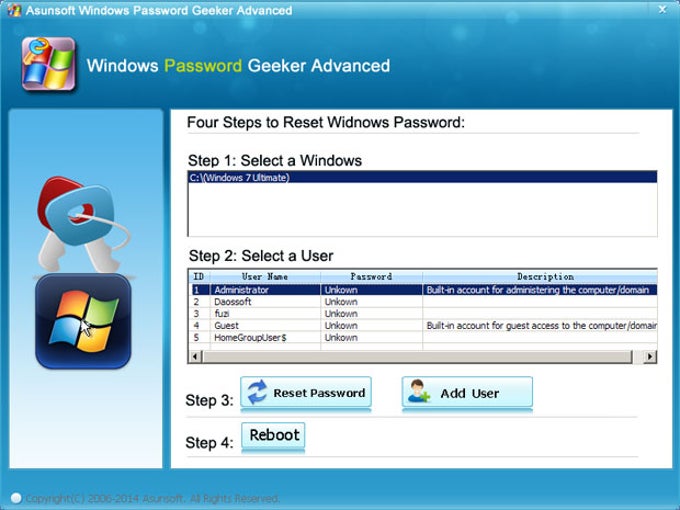
While booting, WinGeeker Ultimate tool will open this time. It will detect the Windows system and accounts where you can reset users, admin, local, HomeGroup, or Guest password. Simply choose the desired user to reset and click 'Reset Password' to proceed. The target user password will be blank after reset.
Windows vista password crack

Then click 'Reboot' to restart the system. Now it will be back without asking password. NOTE: You can also create a new account by clicking 'Add User' button. Conclusion In this guide, we have listed the most favorite ways to reset Windows 10 password however if you have no computer skills then we will recommend to use TunesBro WinGeeker Ultimate tool.

Windows xp sp3 ghost with all drivers iso. It is very simply and elegantly designed specially to help those who are not computer person. It is tested on myriad computer brands and laptops and has been successful in every system.

[/ITEM]
[/MAIN]
04.03.2020

Windows Password Crack Iso

4

Reset Windows Password (zipped ISO image) Reset Windows Password was developed for resetting, changing and recovering Windows logon passwords and unlocking user account. For example, when the Administrator’s password is lost or forgotten. Lazesoft Recover My Password Home Edition is a Windows Password Recovery Freeware to reset lost Windows logon password to blank.

Password protection adds another level of security to your computer. It is simple enough to lock your User Account.

You can either set a new password during installation or later on in Control Panel. Though it is not required if you are the only user of your machine, password is important if multiple users are using the same machine or when trying to assign a User Account for your child with parental controls. But one problem which is literally annoying is when you. But there are different ways to get around a logon password without even knowing it.

Using a password reset disk is a very common option to. But the only catch is that you should have a password reset disk in advance. If you don't have any reset disk, don't worry. We are going to fix it using these methods. Method 1.

Crack Windows 10 Password with Kon-Boot allows you to log on to Windows without even knowing the password. It just hooks into the BIOS and changes the Windows kernel contents temporarily while booting.

Then, you can enter anything or leave the password blank while logging in. The original password will come again when you start your PC next time without Kon-Boot. The system will discard those changes and will act as if nothing happened.

Simply download Kon-Boot on another system and burn the ISO file to CD or write the image file on a USB drive. After doing it, simply boot your locked PC to external device where ISO file or image is written. Set the boot device to USB or CD in BIOS and it will show up a white screen.

Press any key and it will show up the process of tweaking BIOS functions. The system will boot normally after a few seconds. Cons: 1) Doesn't work with latest Windows 10. 2) Complicated text based program.

Also read: Method 2. Reset Microsoft Password After Windows 8, people are mostly using their official Microsoft account to log into their Windows. In case you forgot your password in Microsoft account, simply use another to visit the password reset page on Microsoft site and reset the password online.

It is a lot easier than resetting the password on local account. Go to from a separate computer or smartphone and select 'I Forgot My Password' and click next.

You need to use your alternate email or phone number you've provided when starting your Microsoft account. It won't work if you don't have an alternate email. Here, Windows 10 account can be converted to a local account from boot media, so you don't have to lose files to log into Windows 10. Enter the security code and move to the next page. Doesn't work with local or administrator accounts. Resetting Microsoft account password will directly reset the password of your Microsoft related services as well like Skype, One box, Hotmail, etc. Break Windows 10 Password with WinGeeker Ultiamte You can still bypasses the log-in screen without actually re-installing the operating system, just by using.

It can be installed in Windows virtual space without using your PC, which will read iSO files and Windows underlying data and run in DOS without password. It provides visual interface to the users which is very simple to use. You can burn ISO files directly with this tool to USB drive/CD/DVD in Windows and without using reset disk. It is guaranteed that no data loss will occur and it can be used to crack any types of account password like local, administrator, Microsoft, root and domain profiles. Step 4 Begin to Crack Windows 10 Login Password After changing the boot order to USB and restart your PC.

While booting, WinGeeker Ultimate tool will open this time. It will detect the Windows system and accounts where you can reset users, admin, local, HomeGroup, or Guest password. Simply choose the desired user to reset and click 'Reset Password' to proceed. The target user password will be blank after reset.

Windows vista password crack

Then click 'Reboot' to restart the system. Now it will be back without asking password. NOTE: You can also create a new account by clicking 'Add User' button. Conclusion In this guide, we have listed the most favorite ways to reset Windows 10 password however if you have no computer skills then we will recommend to use TunesBro WinGeeker Ultimate tool.

Windows xp sp3 ghost with all drivers iso. It is very simply and elegantly designed specially to help those who are not computer person. It is tested on myriad computer brands and laptops and has been successful in every system.